
Industry Assessments & Technical Advisories
- 📌 Microsoft Message Center (MC1551147): Legacy Word compatibility settings retire Dec 2026 on Windows; export critical layouts to PDF now.
- 📌 Windows Forum Analysis: Files saved in Word 2010 or earlier face text reflow, spacing shifts, and displaced images.
- 📌 Microsoft Learn Security Guide: M365 Business Premium delivers Defender Safe Attachments and anti-phishing to block malicious macros.
Dec 2026 Word 2010 Compatibility Retirement: Safeguarding Business Documents with Microsoft 365
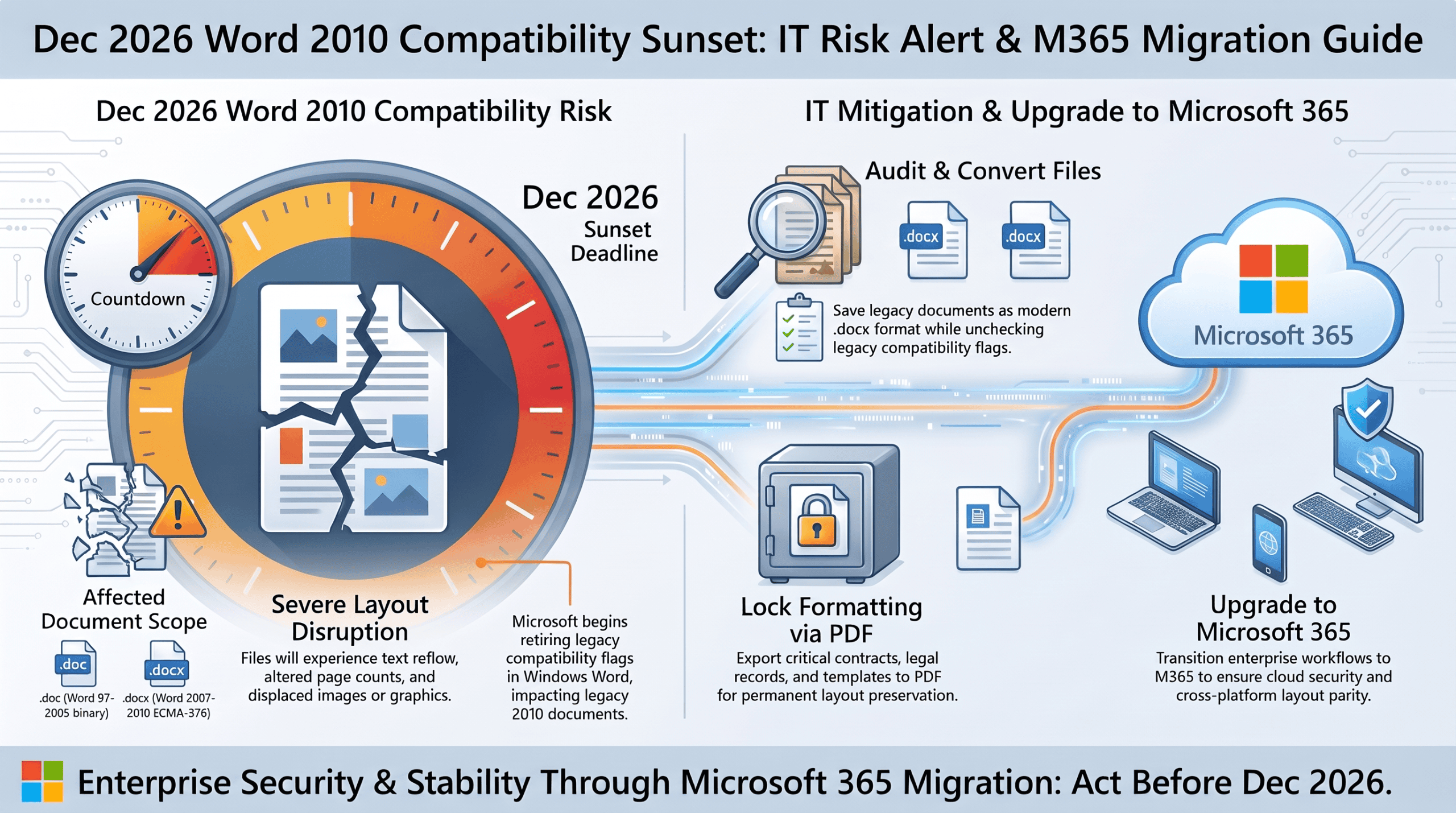
Under Microsoft’s official advisory (MC1551147), desktop Word for Windows will begin retiring legacy layout compatibility settings for documents created or last saved in Word 2010 or earlier starting December 2026, with Word for Mac following in early 2027. For Malaysian organisations still relying on legacy quotations, legal contracts, ISO SOP forms, or technical manuals stored on shared drives, opening those files after the rollout can trigger immediate text reflow, misaligned tables, shifted images, and altered page counts.
Many business owners assume that keeping an old PC on Office 2010 without updates will avoid this disruption. In reality, external clients, suppliers, and banks are already running modern Word versions—meaning any legacy file sent out will still break on the recipient’s screen. Worse still, Office 2010 lost all security patches in October 2020, and even Office LTSC 2021 reached End of Support in October 2026, leaving unpatched desktops wide open to macro-based phishing and ransomware.
Standardising on Microsoft 365 (M365) Business transforms unpredictable software chaos into a predictable “cup of coffee a day” OpEx subscription—keeping every employee on 100% synchronised modern .docx standards while layering enterprise-grade cloud threat defence.
Industry Benchmark & Deep Technical Intelligence
| Evaluation Metric | Modern Architecture (Microsoft 365 Business) | Legacy Approach (Office 2010 / Perpetual) |
|---|---|---|
| Layout & Format Consistency | 100% synchronised modern .docx engine across PC, Mac & Web | Legacy compatibility retired Dec 2026; high risk of reflow & page shifts |
| Cybersecurity & Macro Defence | Built-in Defender Safe Attachments, anti-phishing & ransomware shield | Zero security patches since Oct 2020; vulnerable to malicious macros |
| TCO & Financial Predictability | Predictable OpEx (~USD $3.50–$22/user/mo) with 1 TB OneDrive | Fragmented CapEx purchases, manual upgrades & local file server costs |
| IT Management & Helpdesk Load | Centralised Intune & Entra ID control with version history recovery | Frequent formatting tickets, manual key tracking & offboarding gaps |
📌 Intelligence 1: Inside MC1551147 — Why Retiring Word 2010 Compatibility Settings Will Trigger Year-End Layout Chaos
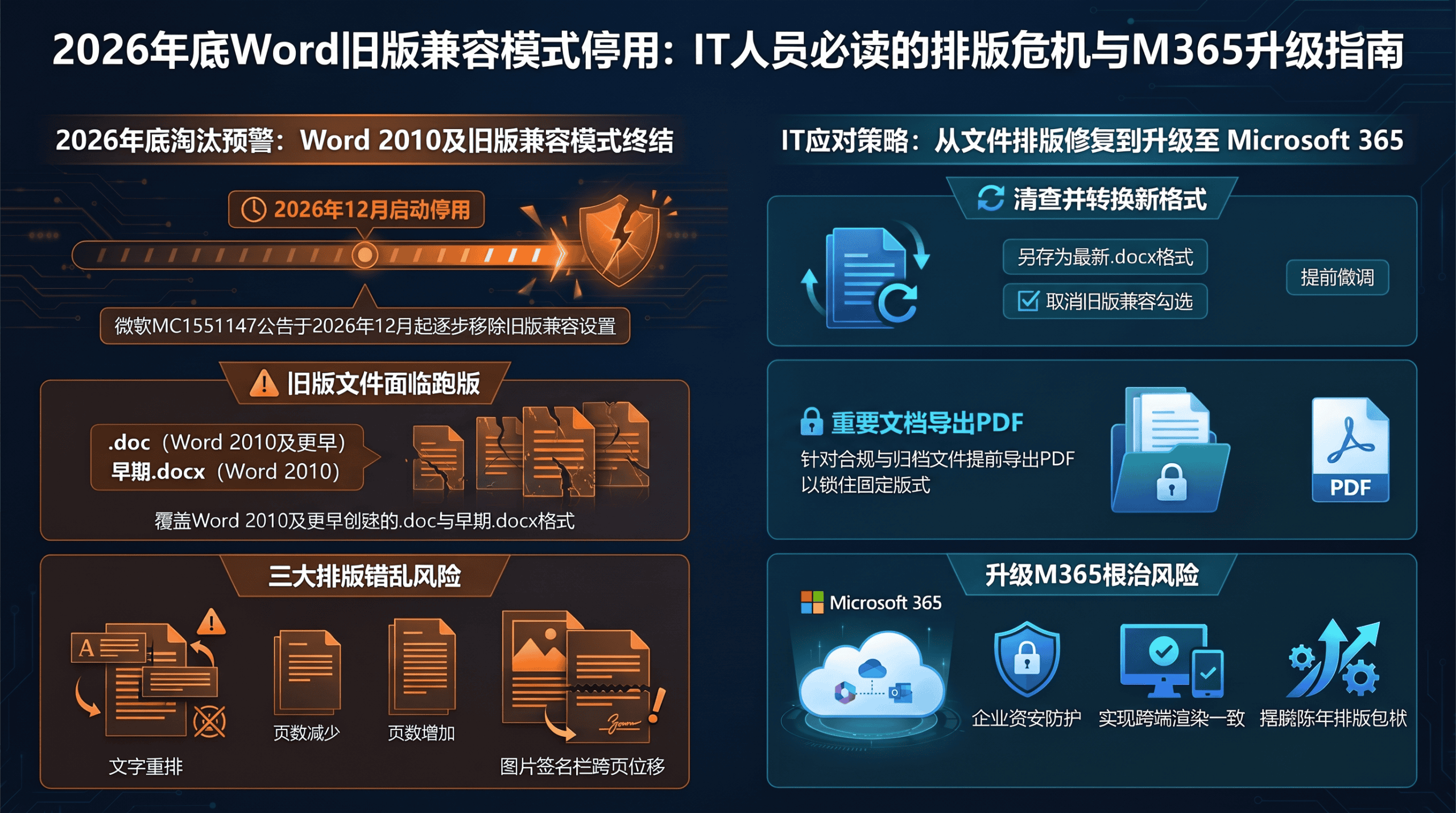
Published on 13 November 2026 in the Microsoft 365 Message Center under MC1551147, Microsoft confirmed that it is retiring a set of legacy compatibility options in desktop Microsoft Word for documents running in Compatibility Mode. The rollout begins on Word for Windows in early December 2026—completing by late December—followed by Word for Mac in early 2027 (with GCC, GCC High, and DoD environments rolling out from late December into early January 2027). Microsoft’s stated objective is to simplify how Word renders document layouts and deliver a consistent cross-platform experience.
A common misconception among IT teams is that this change only touches files created before 2010. As technical breakdowns on Windows Forum and Magica highlight, the trigger is the Word version flag embedded in the file—not the calendar year it was edited. Any Malaysian company still reusing a quotation template, ISO quality checklist, or tender form originally built in Word 2010 (or earlier) and saved in Compatibility Mode remains directly in scope, even if staff updated it last week.
Because Microsoft has not published the exact list of deprecated layout flags and the update applies automatically without admin intervention, affected documents will not lose text but can experience sudden text reflow, altered line spacing, shifted tables or floating shapes, and changed total page counts. For legal agreements with page-number cross-references or client-facing proposals, a single shifted page can derail an audit or embarrass a sales team. Microsoft explicitly advises organisations to review critical legacy documents before December and export static records to PDF to lock in their current appearance.
💡 Mira E Insight: IT teams should immediately audit shared drives for .doc and Compatibility Mode .docx files before December, batch-archiving closed contracts to PDF and converting active templates to modern .docx standards. (Source: Microsoft Message Center MC1551147)
📌 Intelligence 2: Malaysian Ransomware Attacks Surge 42% — How Unpatched Legacy Office Suites Expose SMEs
Across Malaysia, many SMEs still treat productivity software as a one-time purchase to be stretched for a decade. Yet local threat telemetry shows that delaying upgrades carries severe operational risk. According to CyberSecurity Malaysia’s Q2 2026 incident data, local cyber incidents climbed 24.09% quarter-on-quarter to 2,715 cases, with 2,228 phishing incidents leading all reported fraud categories. Furthermore, Simply Data’s 2026 Malaysia Cybersecurity Landscape analysis notes a 42% year-over-year surge in ransomware attacks on Malaysian businesses, with 67% of SMEs affected and over 30 confirmed ransomware incidents recorded in H1 2026 alone.
Outdated Office installations sit at the heart of this attack surface. Office 2010 stopped receiving security updates on 13 October 2020, and even Office LTSC 2021 reached End of Support on 13 October 2026 with no Extended Security Update (ESU) path. When an employee on an unpatched Word client opens a phishing attachment disguised as a supplier invoice or bank statement, legacy suites lack modern cloud sandboxing and macro-blocking controls—allowing ransomware payloads to encrypt shared network drives within minutes and trigger costly PDPA breach exposure.
Migrating to Microsoft 365 Business Premium solves both the formatting and cybersecurity equations in one move. Alongside always-current desktop apps and 1 TB of versioned OneDrive storage per user, organisations gain Microsoft Defender for Office 365 Plan 1 (Safe Attachments and Safe Links), AI-powered ransomware protection in Defender for Business, and Microsoft Intune device management—eliminating fragmented licensing while keeping IT overhead predictable.
💡 Mira E Insight: Rather than waiting for December layout breakages or a macro-borne ransomware incident, Malaysian SMEs should consolidate legacy licences into an M365 subscription to unify compliance and endpoint defence. (Sources: CyberSecurity Malaysia / AceIT & Simply Data H1 2026 Report)
Microsoft 365 Business Specifications & Security Capabilities
- User Capacity & Device Coverage: Designed for 1–300 employees; each user licence covers up to 5 PCs or Macs, 5 tablets, and 5 mobile devices with always-current Office apps.
- Cloud Storage & Ransomware Recovery: Includes 1 TB of OneDrive cloud storage per user with built-in file versioning and rapid rollback against accidental deletion or encryption.
- Modern OpenXML Standardisation: Continuous layout and feature updates across Word, Excel, and PowerPoint ensure zero formatting drift when exchanging files with clients or overseas HQs.
- Email & Macro Threat Protection (Business Premium): Integrates Microsoft Defender for Office 365 Plan 1 with Safe Attachments, Safe Links, and anti-phishing policies.
- Endpoint & Identity Governance (Business Premium): Combines Microsoft Defender for Business, Microsoft Intune, and Entra ID for centralised patching, device encryption, and remote wipe.
- Flexible OpEx Licensing Tiers: Available across Business Basic (from ~USD $3.50/user/mo), Business Standard (full desktop apps), and Business Premium on predictable annual or monthly billing.