
7 Heart-Stopping Scenarios of Insider Data Theft and Leakage: The Critical Blind Spots of Enterprise File Servers
In today’s business environment, where remote work and mobile operations have become the standard, many business owners and IT managers fall into a fatal blind spot: “As long as an employee enters the correct username and password, the system assumes they are safe.”
However, data is your company’s ultimate asset. When employees access internal files from external, unprotected environments—or when insiders harbor malicious intent—traditional defense mechanisms often collapse entirely. The Mira E team has compiled 7 real, heart-stopping data leak scenarios. Check if your business is currently exposed to these catastrophic cybersecurity risks:
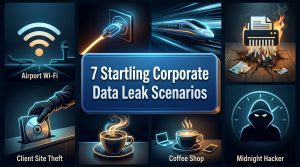
Case 1: The Fatal Airport Wi-Fi Connection
 When employees connect back to the office network, you only check their username and password—but do you check the security of their connection environment? When staff browse your servers via unsecured public networks, your File Server doors are effectively left wide open for hackers.
The Incident: The CFO was waiting at the airport premium lounge for an international flight. To clear his backlog before boarding, he turned on his laptop and connected to a hotspot named
Airport_Free_WiFi, then fired up his VPN to access the company’s File Server. Unknown to him, this hotspot was not provided by the airport, but was an “Evil Twin AP” set up by a hacker sitting right behind him disguised as a passenger. As the CFO entered his credentials and browsed folders, all data traffic, file contents, and even his File Server session tokens were intercepted and copied cleanly onto the hacker’s screen.Vulnerability Analysis: From a cybersecurity perspective, there is a lack of Host Check / Endpoint Security Compliance. The system blindly trusted the connection without verifying if the user’s environment was secure or if the encrypted tunnel was compromised by a Man-in-the-Middle (MITM) attack.
Case 2: The Airport USB Charging Station Trap (Juice Jacking)

You strictly forbid employees from connecting to unknown Wi-Fi networks when outstation, but do you have a policy against plugging into public charging ports? While your staff think they are just getting a “free charge” for their company laptop, your core corporate secrets might be quietly drained through that very charging cable.
The Incident: A senior sales specialist, Chen, who just finished an overseas exhibition, noticed his laptop battery was down to 10% at the airport boarding gate. Seeing an empty slot at the public charging kiosk, he quickly plugged his laptop in using a standard USB cable. Relieved to see the “Charging” icon, he opened his remote connection to the company File Server to amend an agreement. However, that seemingly innocent USB port had been modified by hackers. While the cable conducted power, a microchip hidden behind the wall was keylogging his inputs and bypassing firewalls to sync and copy the newly opened annual distributor cost sheets and margin analysis to a remote hacker server.
Vulnerability Analysis: Lack of hardware Port Control on endpoint devices. Additionally, there was a failure to conduct cybersecurity awareness training regarding public charging data transfer risks, and a lack of protective gear (such as company-issued USB data blockers).
Case 3: Commercial Espionage at 300 km/h on the Bullet Train

If your HOD or Sales Director decides to jump ship tomorrow, can they currently sit in a cafe or on a train and use their legitimate credentials to legally download your entire hard-earned client database? Do you have any mechanism to detect and stop them “on the spot”?
The Incident: On a southbound bullet train, Sales Director Chang was staring out the window, but his hands were busy on his laptop. He had secretly accepted a poaching offer from a competitor and was scheduled to resign next week, bringing his entire team along. Right now, he was utilising the train’s free Wi-Fi to comfortably log into the company’s File Server. “Since I’m only resigning next week, downloading contracts now is technically legal, right?” Chang thought. With a few clicks, the historical contracts, pricing baselines, and custom spec sheets of the company’s top 50 core clients for the next three years were being zipped and transferred into his personal hard drive. By the time the train reached its destination, the company’s lifeline had been neatly “packaged and stolen”.
Vulnerability Analysis: Lack of Context-Aware Access Control and data download Rate Limiting. The system only verified the password but failed to flag the atypical, high-volume download behavior within a short timeframe.
Case 4: The “Scorched Earth” Retaliation Before Offboarding

When an employee is retrenched or holds a grudge over poor performance appraisal, is your File Server acting as their weapon store or your bunker? If they start maliciously wiping out files, will your IT team only realise after the damage is done, or can you cut off their access instantly?
The Incident: The PR Manager, Kak J, found out that she was being retrenched by the end of next month due to company restructuring. Outwardly she co-operated with the handover, but inwardly she was filled with resentment. Taking advantage of the weekend at home while her remote access rights were still active, she connected to the File Server. Instead of copying files, she went into folders containing media relationship databases accumulated over five years, crisis management SOPs, and next month’s unreleased product press releases, and pressed
Shift + Delete. She intended to use this “scorched earth” move to sabotage the company and give them a costly lesson.Vulnerability Analysis: Absence of instant blocking and alerting mechanisms for “abnormal bulk deletion”. Furthermore, there was a gap in synchronisation between HR’s offboarding workflow and real-time IT privilege revocation.
Case 5: “Souvenir Theft” at Client Site
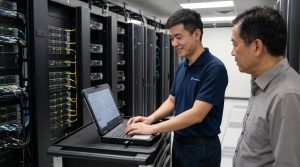
On-site and field engineers interact closely with clients and usually hold high levels of trust. But have you ever considered that instead of bringing back recurring business, they might be treating your customer asset listings as a “souvenir” to hand over to their next employer?
The Incident: A maintenance engineer, Ah Teck, was performing routine servicing at a major client’s server room. Having already tendered his resignation, he was preparing to hop over to a rival company. While chatting and laughing with the client’s network admin, he used the client’s network to log back into his HQ’s file server. “Just checking the OEM maintenance manual,” Ah Teck told the guy next to him. But behind the scenes, he opened the master registry containing all contracted clients in that region, their machine configurations, and maintenance cycles. He quietly copied these files onto a micro thumbdrive disguised as his wireless mouse receiver. Next month, the competitor would use this exact list to poach clients right before their contract renewal dates.
Vulnerability Analysis: Failure to dynamically restrict the access scope of field/remote staff based on specific tasks, coupled with a lack of endpoint USB storage lockdown (USB Lockdown).
Case 6: The Cafe “Salary Time-Bomb”

With local data protection laws (like PDPA) drastically increasing fines, when your HR or Finance staff downloads highly sensitive data onto portable laptops for convenience, have you considered that a single moment of carelessness in a cafe could bankrupt your corporate reputation overnight?
The Incident: On a Friday afternoon, Grace, an HR executive, was working remotely from a trendy cafe. To verify next month’s salary adjustments and bonuses, she found logging into the internal portal too sluggish, so she directly downloaded the master Excel sheet containing full employee names, IC numbers, salaries, and bank account numbers onto her laptop desktop. Mid-way, she stood up to use the washroom, leaving her laptop on the table. In just 90 seconds, by the time she returned, the laptop was gone. Three days later, full salary details and special director-level allowances were leaked and circulated wildly in staff private WhatsApp groups, triggering mass internal disputes and a strike risk.
Vulnerability Analysis: Allowing employees to download and store sensitive data locally (Data Leaking) without Data Loss Prevention (DLP) controls or enforcing read-only restrictions for external environments.
Case 7: The 2:00 AM “R&D Insider Threat”

Is an employee working from home late at night genuinely rushing your project timeline, or are they working on their next job portfolio? When your core intellectual property is being systematically pillaged chunk by chunk, is your system alerting you, or is it blindly assuming they are a hard-working employee?
The Incident: At 2:00 AM, the whole city was asleep, but R&D engineer Liew’s room was illuminated by the blue glare of his monitor. Looking at the lucrative offer letter from an MNC rival on his desk, he smiled. He connected to the internal server via VPN and opened the source code repository he usually maintained. To avoid raising alarms, he didn’t pull everything at once. Instead, like ants moving food, he downloaded one core module every 10 minutes. “Working from home to rush project delivery” became his perfect cover. By dawn, the proprietary algorithm source code—developed over five years with millions in R&D investment—was safely sitting inside his personal external drive.
Vulnerability Analysis: Absence of special access controls for sensitive time windows (non-working hours) and lack of anomaly detection/alerts for accessing high-value digital assets (like Source Code).
🚀 Expert Conclusion: How to Safeguard Against Insider and External Threats?
After reading these 7 heart-stopping scenarios, do you realize that traditional defenses relying solely on “passwords” and “basic VPNs” have completely failed? Today’s enterprises require comprehensive IT Consulting, Zero Trust Architectures, robust Endpoint Security, and mature Data Loss Prevention (DLP) frameworks.
🎯 Transform your business resilience today. Mira E — We Make IT Possible.
Don’t wait for a data disaster to hit before auditing your system vulnerabilities. Whether it’s remote work security, insider access control, or proactive threat defense, Mira E’s specialized consulting team is here to engineer an unbreakable digital shield tailored for your enterprise.
👇 Connect with our IT experts and secure your business today